Having been asked by more than one person last year how I added my students I thought I’d post some instructions.
When I first logged into the site I found I was on the Add Students page where you will find instructions. I had already created a spreadsheet with the required information, first name, last name, age and class name. Copy your spreadsheet by selecting all the cells then use Ctrl – c. Now go back to the site and click in the first cell in the header columns – it may look at this point that this is impossible! But click in it anyway then paste – Ctrl-v
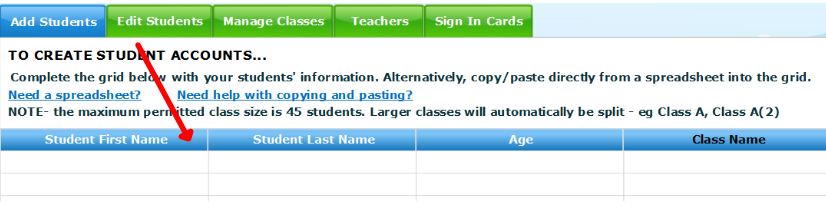
Hopefully your student or students should appear in the grid – scroll down and select ‘Submit’. The first time I tried I received an error message that some surnames were too long, so I shortened them and tried again – success, the whole school – over 1000 students enrolled. Teachers can play too – I love the age category: 19+!
Thanks for posting this – it helped!
Jo
Glad to help Jo.
I REALLY LOVE MATHS.IT IS MY FAVOURITE SUBJECT AMONG ALL THE SUBJECT.MY TEACHER HELP AND I AM THEN INTRESTED IN IT.I AM NOT CONFUSED IN IT
Hi Eman, I’m really pleased to hear you enjoy Maths – it’s an excellent subject! I hope you enjoy World Maths Day!
Hi Colleen.
Did you have any trouble DURING your adding students? I added two classes with no problem, did EXACTLY the same with the third and it WILL NOT WORK!
Driving me mad!!
I added all students, over 1000 at once Jane, quite early – maybe that helped?
I’m glad it helped Dennis. Enjoy the event!
I also had problems. After an hour of trying I stumbled upon your site. Thanks for your help on the completely counter-intuitve system for registering pupils this year. We are now up and running.
Regards
DGG