Correlation and Regression

Try out the new table regressions in Desmos. This is so easy to use; I copied data from a spreadsheet and pasted it into a blank expression line. To create a regression, simply click the Add Regression icon to the left of your expression. I tried the Desmos table regression using a data set from this new Transum Activity, Odd Scatter Out, where students have to identify the odd one out from a set of 5 scatter diagrams. Link to Desmos page.

For more on Statistical functions with Desmos, see this article from the Desmos Help Centre.
Keep an eye on this Desmos playlist to see what’s new.


Further resources for correlation and regression:

This GeoGebra applet allows students to move points and watch the effect on the line of best.
GeoGebra Correlation

This can be used in class by asking students to plot the points, draw their lines of best fit and then comparing with the computer. This worked really well on my phone, I simply sent myself an email with the link and was able to move points easily. This could also be used with younger classes when talking about lines of best fit.

We can also demonstrate correlation coefficients and lines of best fit with this PhET simulation on Least Squares Regression.

Correlation & Line of best fit
PhET – Least Squares Regression

Choose from a range of examples or choose Custom to add your own points and guess then check the correlation coefficient. You can also draw your own line of best fit and compare it to the theoretical line of best fit. Note the option to include residuals for both your own attempt and the line of best fit.


We can check Regression Calculations using this Linear Regression calculator from Social Science Statistics.

Linear Regression
Social Science Statistics – Linear Regression

On the subject of correlation coefficients, we can play a game to see how well we can guess the correlation coefficient! Guess the Correlation Coefficient.

guess-the-correlation
Guess the Correlation – Omar Wagih

From Cambridge PhD student, Omar Wagih ‘Guess the Correlation‘, a rather addictive game with a purpose – Omar Wagih is collecting the data on the guesses collected and using it to analyse how we perceive correlations in scatter plots. Select About to read the rules and further details.


We also need to look at ranked data and students must be able to calculate Spearman’s rank correlation coefficient from raw data or summary statistics. Again, Social Science Statistics, offers us a calculator which will be useful for checking work.

Spearman's RanK Calculator
Social Science Statistics

Calculation details provide a useful check on work.
Note Social Science Statistics also has a calculator for calculating the Pearson correlation coefficient.

Technology in Mathematics

An update has been made to the Use of Technology page.

In particular note the GeoGebra resources from Edexcel (and also OCR).

From Edexcel you can use A Guide to using GeoGebra when teaching AS and A Level Mathematics which links to numerous GeoGebra files clearly mapped to the specification content. You can also access an excellent collection relating to the Pearson books (see table below). Whilst linked to the books many of these GeoGebra resources do stand alone, for example check this equations and inequalities example from the Pearson Maths A Level Pure 1 collection.
Edexcel Geogebra Equations and Inequalities

Mathematics
Pearson Maths A Level Year 1
Pearson Maths A Level Year 2
Pearson Maths Statistics and Mechanics Year 1
Pearson Maths Statistics and Mechanics Year 2
Further Mathematics
Pearson Maths A level Core Pure 1
Pearson Maths A level Core Pure 2
Pearson Maths A level Further Pure 2
Pearson Maths A Level Further Mechanics 1
Pearson Maths A Level Further Mechanics 2
Pearson Maths A Level Decision 1
Pearson Maths A Level  Decision 2
Pearson Maths A Level Further Statistics 1
Pearson Maths A Level Further Statistics 2

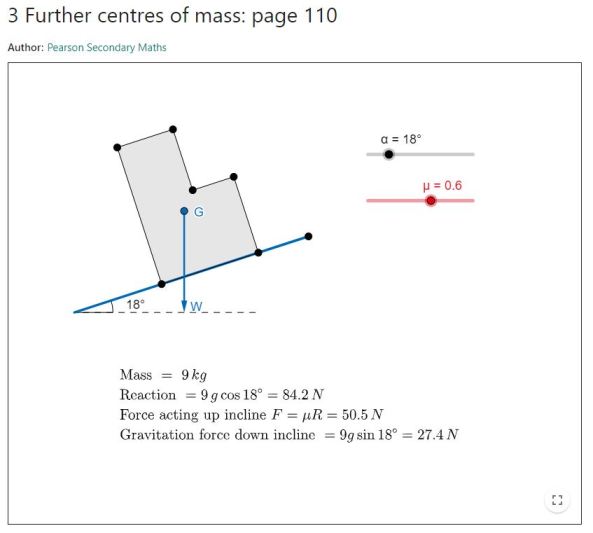
It is good to see all the GeoGebra resources for Further Mathematics, for example, check Explore toppling and sliding using GeoGebra.

Pearson Maths A Level Further Mechanics 2 Toppling and Sliding

For exploring the Large Data, on AQA’s All About Maths see AQA Large Data Set – Guidance and Worksheets including a tool to help support teaching the statistics content of the specification. This is an amended version of the large data set spreadsheet, the first three sheets are as on the AQA large data set but there are many additional sheets which allow students to explore the large data set. The tools are all provided for students, they do not need knowledge of Excel, meaning time can be spent on interpreting the data rather than learning about Excel. The worksheet on Exploring the Large Data Set could I think be usefully used lower down the school to get students used to working with more data.

A separate page is available on Statistics.

Colourful Chi Squared!

Updating a presentation, Colour in Mathematics or pdf version, Colour in Mathematics led to a happy find…

Chi Squared examplw

When teaching the Chi Squared test I have often found that students are not always clear on their interpretation of the contributions to the test statistic. A worked example with a little colour to help where we look at the observed data. the expected probabilities and the chi squared contributions seems to work well . This exercise made me realise that a chi squared calculator I had previously recommended did not seem to be working, so fortunately I found a better one!

From Social Science Statistics this Chi Squared Calculator is for a contingency table with up to 5 rows and columns. It is very simple to use, enter the group and category names, then the data, choose the significance level and calculate.
Chi Squared Calculator 1
Chi Squared Calculator 2

A clear conclusion is then given:
The chi-square statistic is 10.2061. The p-value is .037096.
The result is significant at p < .05.

The calculator is included on the Statistics 16+ page of Calculators & Tools.

Note the many other calculators  for statistical tests  available on Social Science Statistics.

A Level – Draft Specifications & a Statistics Qualification

The A Level Draft Specifications have now been published, including specimen papers.
Use this Twitter List to see updates from all the exam boards. As you can see @Ofqual are making announcements about accredited specifications.

For the specifications use the following links.


Further resources:
AQA Resources including a very useful Specification Summary. AQA have several very clear resources, see: Planning  Teaching and Assessment which includes the Specimen Papers and mark schemes.

Edexcel Specification & Sample Assessment Materials note the inclusion of a data set for AS and A Level.

Edexcel – Assessment support including mapping documents.

From OCR, specifications, specimen papers and other resources can all be downloaded here.
Note the option to download a zip file with the specifications and sample assessment materials.

OCR have individual subject pages with further resources:

MEI have helpfully compared Further Mathematics Specifications so you can compare the content and structure from each board.

OCR have also linked to some new sample MEI resources. These include some very nice “problem shorts” and also the use of technology to analyse large data sets.
MEI Sample Resources

OCR A Level Check In Test

OCR A Level Check In Test

I do like OCR’s check in tests for GCSE and I see a small number check in tests and lesson elements on the A Level subject pages; I assume this collection will grow.

From MEI, see this short video presentation on the new specification including the new work on large data sets.

For further reference documents and some suggested resources see A Level Reform.

For easy access to announcements regarding Maths from the examination boards, use this twitter list. (You do not have to use Twitter to access the list).


Royal Statistical Society Problem SolvingEduqas will not be offering AS / A Level Mathematics specifications, but note their Level 3 Statistical Problem Solving Using Software. See also  the International Centre for Statistical Education (ICSE) with Plymouth University and you can follow @IntCSE on Twitter. It may be that some of the resources here will be useful for our teaching of Statistics.

Educas state: “The objective of this qualification is to assist the understanding of the problem-solving cycle of planning, collecting, processing and discussing in meaningful contexts and to use statistical software to process real data sets. It has been specifically designed to be taught in schools and colleges to equip learners aged 16-19 with a broad range of skills empowering them to successfully negotiate statistical problems in Higher Education or the world of work.”

This discovery led me to a treasure trove of resources from Educas for Mathematics at all levels, including GCSE – this definitely needs further exploration!