Chancing upon this tweet from Transum proved fortunate. Hidden gems indeed, I had not noticed the Advanced Starters before, some of which I think could be useful for students aiming at the highest GCSE grades as well as for Advanced Level students.
The problem, Find the Radius, illustrated in the tweet is very neat!
I wrote the above in February of last year and I see from Transum’s latest newsletter that The Advanced Starters collection has grown. I see many starters here I like, thinking about next year it’s a good time to check these. With linear courses, starters provide an ideal opportunity for review.
Looking at Coordinate Distance, I can never resist a Desmos page to illustrate a problem! This starter could be also be used to review some coordinate geometry – find the midpoint? Find the equation of the line?
Transum – Advanced Starters
Transum – Advanced Starters
For more on Transum see this post which includes some great Venn Diagrams resources and a reminder that there is a very clear index for teachers and another for students. The extensive library of activities on Transum are all free to use. Activities such as this Algebra resource on Completeing the Square can be checked as part of the free offering.
A subscription offers teachers answers to for example the Advanced Starters and Exam Questions.
Using diagrams as prompts like this is excellent for Retrieval Practice.
Seeing this well-received resource, GCSE Question Prompts on TES reminded me that I have successfully used this idea myself before. For example for GCSE revision I have given students a selection of various triangle diagramsand asked them what the question might have been. This proved to be a useful way of revising several topics – some of which students sometimes mix up! For several of these triangles there are many possibilities and students can be asked which lengths and / or angles they could work out.
Further excellent examples come from Mark Greenaway – GCSE Visual Prompts for both Higher and Foundation. Mark’s resources (Prompts 1) show the diagram first and then also include the complete question. Prompts 2 provides 25 starter prompts for students to produce their own questions and answers using the given information.
Peter Mattock has createdGoal Free Problems, a site he set up, in his own words “to allow teachers to access and share goal free problems created by myself and others. Goal free problems have been proven to support pupils in improving their knowledge and understanding by removing the cognitive load of the goal and therefore not prompting means-end analysis of a problem.”
Here you will find hundreds of questions categorised by topic; there are also mixed questions available. A wonderful resource.
On the subject of diagrams, I really like Tom Sherrington’s post “Empowering students to own their learning solves maths problems“; a great idea to start with a diagram with no labels at all as a way into a problem. I tried this with Year 10 (very able students), presenting them with only Tom’s diagram and was very pleased indeed with the outcome. I didn’t even give them the question – just the diagram (a small copy each) and we started by deciding what the question might be. We quickly got onto areas as a possibility so then answered Tom’s original question ‘what fraction of the shape is shaded?’. The class happily discussed how to solve the problem and a student asked ‘can we write on the diagram?’ which of course was perfect – absolutely they could write on it. We solved the problem, revising some basics and had the discussion about what to do when you don’t know what to do! I will certainly use diagrams with no labels again.
This idea could be used for a starter on just about any topic – provide students with an image or perhaps just an expression and ask them to write a question to go with the image.
MEI have an excellent free collection of GCSE starters. Designed for the start of a GCSE lesson, the diagrams and questions are very clear and will display well on the IWB. There are several starters under the following headings: Mathematical Reasoning, Number, Algebra, Geometry and Measures and Statistics and Probability. Files with the answers and teachers notes are also provided. Many of the diagrams here could be used for students to write their own questions. It is not always possible to have the IWB up and running, particularly if you are coming from a different room and I do like to get students working straight away. Experimenting, I found that I could take a screenshot (I do like the Windows snipping tool) and fit eight to a page! I used a Word document with very small top and bottom margins and a two column layout.
Staying with MEI, Bernard Murphy has some great ideas here on using pictures in A Level trigonometry. Look at this diagram – all the trigonometric ratios!
How creative can you be? I wonder what they would make of something like this…
What is an arithmagon? Clearly, the numbers in the rectangles are the sum of the numbers in the adjacent circles. Of course, there is no need to use addition and no need to use triangular arithmagons!
These could be used with students of all ages. Young children could practice basic skills or students studying advanced Mathematics could look at Calculus or Complex Numbers for example.The challenge is, of course, to go backwards…(Going backwards in Mathematics really helps understanding).
From Mark McCourt’s emaths, the Teacher Resources include Investigations, Rich Tasks and Puzzles; these include a small collection of Arithmagons by Alan Hodson covering Number and Algebra. The Algebra resources include simplification using like terms and solving linear equations. A PowerPoint file showing an investigative approach using number and algebra and notes are included as is a useful sheet of 15 blank Arithmagons for students to record answers.
Noting this tweet from Spencer Riley (I really like his TeacherLED site which has free high-quality teaching and learning resources compatible with desktop and mobile devices.) I had a look at his Arithmagons resource and can verify it worked very well on my phone as well as on the desktop.
Arithmagons – Spencer Riley on TeacherArithmagons Collection – Craig Barton
From Craig Barton, we have a complete collection, covering Number, Algebra and Shape and Space. Each resource includes a PowerPoint File with clear instructions and a selection of challenges to really make your students think.
Arithmagon Generator – Jonathan Payne
From Jonathan Payne, try this Arithmagon Generator. This is very simple to use and would be an ideal lesson starter. I like the option to use fractions, also to mix the question types as you see in the image. It is possible to choose missing sides, mixed or missing vertices.
From another Jonathan you can find another Arithmagon generator on Jonathan Hall’s wonderful Mathsbot site. As always with Jonathan’s resources you have choices to create the resource you want.
On Transum Mathematics(home of the excellent Starter a Day), the Arithmagon activity has options for forwards and backwards problems on Addition, Multiplication and Subtraction at various levels.
The Transition to Algebra (TTA) project, an initiative of the Learning and Teaching Division at Education Development Center, Inc. (EDC) includes a wonderful collection of Mobile Puzzles. Visit solveme.edc.org to play SolveMe Mobiles (also available for the iPad.)
Looking at the menu, you will see categories with different levels of difficulty available from very simple puzzles to rather more complex puzzles which promote good mathematical thinking.
Students must determine the weight of each object shown which makes a good introduction to the skills required to solve equations, linear and simultaneous.
Looking at some of the Master level puzzles, you will find rather more complex puzzles:
Note the menu in the corner of each puzzle page:
Selecting ‘Information’ provides extensive help; note that various tools are available so you can annotate puzzles and / or add symbols and equations.
Note that you can then drag a heart to subtract a heart from both sides:
Note that under settings you can choose to show numbers in the mobile as in the illustration. If the solution is correct, the mobile will balance.
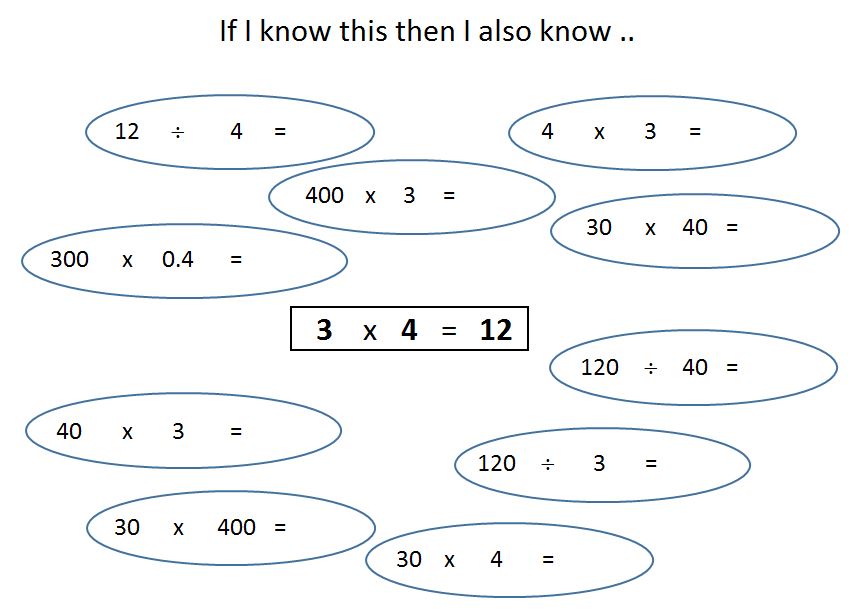
Questions such as this can make a great starter for a lesson and provide the chance to discuss number operations and the relationships between them. Manipulating numbers like this can also help with algebraic manipulation.
Looking for some more examples of this type, I came across a really useful resource on TES, “If I know this then I also know …”by Piers Butler. This would make an ideal lesson starter. As it is an Excel spreadsheet, I thought it would be simple to add another worksheet with the answers and created the Excel file CY If_I_know_this_then_I_also_know_which is a copy of the original, but just adds another worksheet with the answers.


 On the subject of diagrams, I really like Tom Sherrington’s post “