Mathematical Miscellany #44

Some updates this week…

mathsgrader Interactive Assessments

mathsgrader interactive example

MATHSgrader Wk1 Assessment Tier C

From Ross Blair on MATHSgrader comes a complete set of Interactive assessments to complement the Maths Genie homeschool program. The resources are provided in three tiers, Tier A roughly accords with grades 1-2. Tier B with grades 3-5 and Tier C is 6-9. Check the menus for Teachers and Pupils for easy site navigation.


For A Level Owen (Owen134866 on TES) has a library of Mathematics teaching resources, these are really clearly structured with step by step examples. Recently added, is A-level Core Pure Mathematics Year 2/A2 for the second year of Further Mathematics. These resources have been added to the Teaching Resources page for Further Mathematics. This Calculus content is part of the core Pure Mathematics specification common to all examining boards. For more on Further Calculus in Further Mathematics, see my post here.

Also note for Further Mathematics, Jack Brown who has created thousands of videos covering the complete A Level specification has been very busy with his Further Maths collection of teaching videos and exam paper walkthroughs;  the easiest way to navigate the videos is through his website, TLMaths.com. A recent addition to the exam paper walkthroughs is the specimen paper for OCR MEI Modelling with Algorithms.

My post on Graspable Math proved popular last week and included a canvas of the problems from one of Dave Taylor’s wonderful Increasingly Difficult Question sets. I decided I liked the idea of having a canvas ready for his Simplifying Expressions, starting with IDQ-Simplifying Expressions 1, I opened it on my own canvas and adapted it slightly. I do like to keep all steps of the working displayed, so I have put the exercises on the left, creating a good space on the right.

One Incorrect - Don Stward - first problemTaking a canvas and adapting can help you learn to use the interface if you are unfamiliar with it. Using this One Incorrect canvas by Eric Weitnauer which is based on Don Steward’s one incorrect simplification I made a copy of Eric’s canvas and created one for the first problem from Don Steward’s blog post, discovering along the way that if you enter text for a web link, then Graspable Math inserts that as a link.

Note formulas on the menu.
Graspable Math Formulae

For a clear example of this feature in action, have a look at this video.

Graspable Math

A revisit to Graspable Math.

Graspable Math offers a highly innovative interface for mathematical notation. You can read the Graspable Math story here.

You can learn a great deal about Graspable Math simply by experimenting, you can also find plenty of help and tutorials on the Learn section of the site, note the Gesture Library as well as the video tutorial collection.  There is a YouTube channel here.

To experiment with the interface select Explore algebra online.
Explore algebra online
Learn Videos

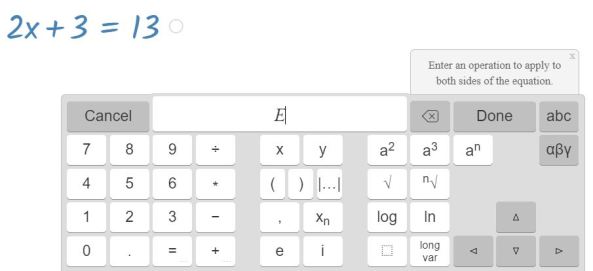
Graspable Math is easy to use, I decided I would solve an equation and wanted to show all the steps. To start, go to a blank canvas and choose Insert / Math Expression, I have used the method of selecting and holding the = sign to start as you can see illustrated in the video above; I was then able to enter an operation to apply to both sides of the equation.

equation to solve

Graspabale Math - Solve Equation

Settings
An alternative to the above is to use the settings menu; choose Dragging to apply the inverse operation to both sides.

We can also illustrate a solution graphically by inserting a graph to open a GeoGebra window.
Graspable Math - GeoGebra

Each expression has a circle at the end – simply drag that to the GeoGebra window. You will sometimes see more than one circle at the end of an expression, select to separate expressions hence showing all steps clearly.

The scrubbing feature is very useful, drag up or down on a number to change its value; the change will propagate through the rest of the working.Create a system of two equations

A great example of the use of the scrubbing feature can be found on this canvas created by Graspable Math for this lovely problem, Create a System of Two Equations by Daniel Luevanos on Open Middle, accessible for students yet such a great task for mathematical thinking. We could discuss inequalities here as well as simultaneous equations.

Sim Eq Opn Middle Problem 1

Cheat Sheet
Graspable Maths have provided a ‘cheat sheet‘ providing a handy summary of how to use the interface.

Graspable Math took one of Dave Taylor’s wonderful Increasingly Difficult Question sets and created a canvas of the problems.
IDQ Changing the Subject

Graspable Math Gesture TutorialWe now have Graspable Math Activities, Graspable Math have a free version and optional subscription (watch for information from Graspable Math on this, but teachers can be reassured that they can continue to use Graspable Math with their students). You can use the Activity Bank to learn how to use Graspable Math. Select Graspable Math Gesture Tutorial and you can watch demonstrations and try the features for yourself. This seems a really good way to learn to use the interface.

It is possible to insert a video onto a canvas, so you could inset a video and then follow the instructions on the canvas. Try this on solving equations.

One Incorrect

Graspable Math – One Incorrect

A lovely way to practice – use this One Incorrect canvas by Eric Weitnauer which is based on Don Steward’s one incorrect simplification.

One Incorrect - Don Stward - first problemAlso a good way to learn to use Graspable Math – save a canvas and adapt it, I made a copy of Eric’s canvas and created one for the first problem from Don Steward’s blog post, discovering along the way that if you enter text for a web link, then Graspable Math inserts that as a link.

Median - Don Steward

Note formulas on the menu.
Graspable Math Formulae

For a clear example of this feature in action, have a look at this video.

See also Graspable Math – The User Guide.

Mathematical Miscellany #18

crashMATHS has some very useful free resources for GCSE and A Level; the site is under development but you will find plenty of useful resources already. Checking for some additional resources on Completing the square for my Year 10 students I came across a GCSE worksheet from crashMaths; this has a good variety of questions including questions to stretch your students aiming at the highest grades. The worksheet solutions are noted as coming soon. For a topic such as completing the square, this is an ideal time to use technology to check our work. Any of Desmos, GeoGebra and WolframAlpha could be used. (Select for Desmos page.)
Completing the Square

crashMATHS AQA styleStaying with crashMATHS, note the A Level Practice Papers and mark schemes, this looks like a very valuable resource. There are several papers and mark schemes available with more coming. Versions are provided for AQA and Edexcel, these use the style of papers we see from the exam boards. Currently, there is nothing for OCR. For Mathematics the content is the same for all the boards and for Further Mathematics we have a prescribed core which must comprise approximately 50% of its content. This common content as we have with GCSE is very useful indeed as we can use resources from all the examination boards.


Continuing with an A Level theme we have a very interesting read, published 25th January 2018, “An evaluation of the item difficulty in AS and A level maths“. This compares the difficulty of items in sample AS and A level maths assessment materials from 2016 and 2017 with the A Level papers from 2015. The overall objective of the exercise was to compare the profile of item difficulty within the SAMs with that of the corresponding 2015 assessments, a question I believe is on the minds of Maths teachers!

SAMS & Legacy A Level comparison

Ofqual: Expected item difficulty Legacy & Reformed Specs


Clearly, we can look at the specimen materials ourselves and make our own judgement on the difficulty but this seems a robust study which used Comparative Judgement. This is a technique where each reviewer reviews many pairs of items and decides each time which item is more difficult to answer.

Items from the sample assessment materials submitted for 4 specifications,  AQA, MEI, OCR and Pearson were used.

The study shows slightly higher levels of expected difficulty for items from the sample assessments relative to the 2015 assessments but the increase in difficulty is small.  The paper states that ‘Such small differences can easily be accommodated by the setting of grade boundaries at awarding. The choice of specifications to teach should be based more on content and style as there is little appreciable difference in difficulty.’

For further reading on Comparative Judgement, look at the work of Daisy Christodoulou.


Emporium

If you have not yet signed up for the new home of Edexcel’s Maths Emporium then do so! This is such a valuable resource. Latest additions include some great new GCSE maths practice papers. There is a wonderful set of practice papers by topic. Look first at GCSE Mathematics, then choose Cabinet 11 for the current specification. Under Practice Papers you will find the themed set – brilliant!
Emporium Resource


NCETM Secondary Assessment MaterialsTo finish this collection, from NCETM look at their Secondary Assessment materials which have been written to support teachers in making judgements on the degree to which pupils have mastered various components of the KS3 mathematics curriculum. This follows the primary Mastery Materials, which was published in 2015.


See further posts in the Mathematical Miscellany Series.

Integration – Desmos & WolframAlpha

With my year 12 students (UK age 16-17) we have been looking at definite Integration. Desmos and WolframAlpha are both excellent for checking work and by using the technology we have a very clear visual representation adding to our understanding.

One of the homework questions for my students involves finding the total shaded area bounded by f(x) = x4−3x3−4x2+12x, the x-axis, the line x=−1 and the line x=3.

We could use WolframAlpha for a quick check. I like the visual representation showing students clearly that they are dealing with areas above and below the x-axis.
Definite Integral
Scrolling down the page we see that this query also returns the indefinite integral.
Indefinite Integral
For the total shaded area, students could change the limits of the query to evaluate each section.

Or we could turn to the excellent Desmos where we can very simply change the limits.

Definite Integration
Definite Integration 2


If you are unfamiliar with Integration with Desmos, turn to Learn Desmos: Integrals.
Note you can explore the graph shown in the video.

We could also show students this introduction to Integration on GeoGebra.
Integration

A version of this post for students which also includes links to some useful notes and examples can be found on Mathematics for Students.
Integration notes University of Plymouth