Desmos – latest version

Update – January 2013

I think they never sleep at Desmos – now look what they have done!

My favourite graphing calculator just keeps getting better and better!

The new version is available now, having used this a great deal over the last couple of weeks, performance has been superb, it’s fast, it’s slick – and it just works – every time! Note that you can download a very clear user guide.

I seem to keep writing about this excellent resource that I use all the time! I have therefore created a page where all the Desmos posts are together.

The new feature which allows text as well as expressions is useful, one could easily add some instructions for students. (Select the image and try changing the sliders).
Experimenting further this week I created some pages to help students who are learning about solving trigonometric equations. I have used an Evernote shared notebook for these, you can just select ‘View Notebook’ to see the pages. Sharing pages is even easier now.

You can follow Desmos on Facebook or Twitter.

Desmos Calculator Examples

Direct link to presentation on Slideshare. Download this pdf file: Assessment – Desmos illustrations – all pages link to a Desmos graph.

My Year 12 (age 16-17) students have been studying coordinate geometry recently. I have been advising them whilst they are studying this topic that it can be very helpful to see good diagrams. I created the above slideshow to provide them with diagrams for a set of questions assigned to them and also to show them examples of the syntax to use for the excellent Desmos graphing calculator. Clicking the image on each slide takes you to a Desmos page with the graphs.

Registering with Desmos (free) gives you the ability to create, save and share pages (Facebook, Twitter or permalink).

Several students have said how much this has helped them.

For further examples see this post.

By Colleen Young Posted in Desmos

Desmos Graphing Calculator

More happy discoveries with the excellent Desmos Graphing Calculator ….

Points of Interest

Click on the image of the cubic graph below and select points on the graph such as axes intercepts and stationary points.
Cubic - points of interest

Parametric Equations

These can be entered (as can coordinates) using square brackets; the domain can be edited.

The sliders feature can be used too, for example try this graph of a circle given in terms of its parametric equations. Selecting the slider allows editing, for example as here it is possible to set the interval so that only integer values are possible.

See also Pretty GraphsDesmos Delights, Graphing Inequalities and these posts on my blog for students: Explore Straight Lines and Explore Graphs.

By Colleen Young Posted in Desmos

Desmos Delights!

Regular readers will know I am a huge fan of the wonderful Desmos graphing calculator.

Take a look at the home page for some brilliant examples.
Click on any of the graphs to explore further and have a look at the equations used.
I have found this instructive for learning more about the syntax one can use.

For example, one can plot individual points: (click the image for the Desmos page)

…or restrict the range:

I thought I would create a slideshow for my students showing the different types of graph which they should be familiar with at GCSE (taken at age 15-16 in the UK).
Each slide links to a Desmos page where they can use the sliders to explore families of curves.

This has also been uploaded to Mathematics for Students.

Pretty Graphs!

love Desmos

The Desmos graphing calculator has to be one of my favourite graphing tools. It’s powerful, easy to use, allows one to share graphs and it is possible to create an account and save graphs.

Polars - sliders

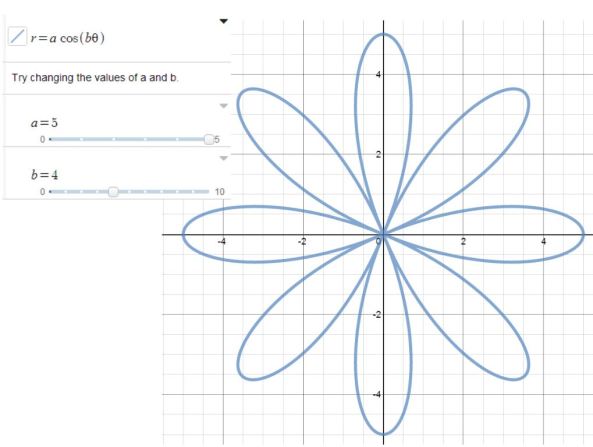
Using the sliders feature students could investigate any graphs. The Further Mathematicians could easily explore the family of rose curves for example. Click on the image below then play with the sliders!

For further applets and resources to explore polar curves see this page on Mathematics for Students.